


Slopes: Ski & Snowboard
4.8766.00 Reviews
App Specs
- Version
- 2026.10
- Updated On
- License
- Free
- Downloads
- 500,000+
- Developer
- Breakpoint Studio LLC
- Categories
- Sports
- Platform
- Android, iOS
Screenshots

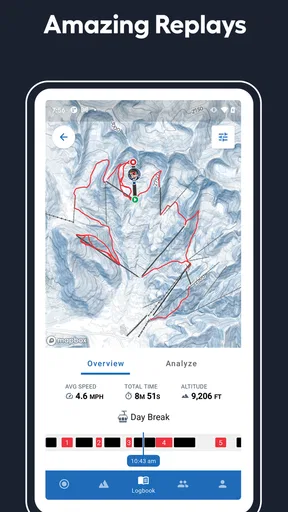
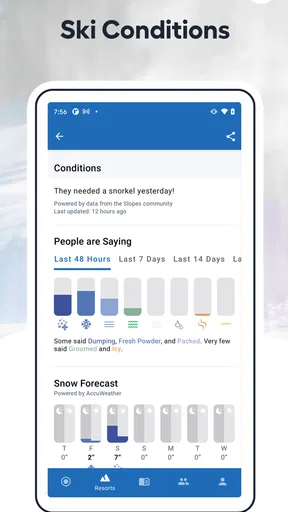
 Analysis by AppCompare
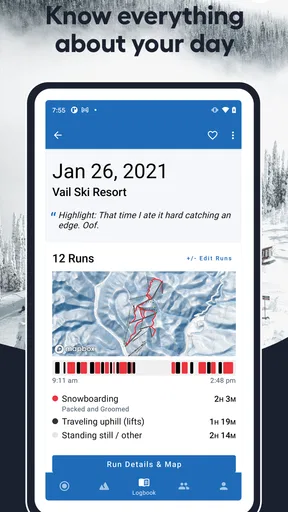
I judge a ski-tracking app less by how much it promises than by whether it stays out of my way once I’m dressed, geared up, and heading for the lift. That is the practical appeal of Slopes: Ski & Snowboard: it brings mountain-day tracking and resort information together, so I can check useful details before setting off and look back at the day afterward. I’d consider it most useful for skiers and snowboarders who enjoy seeing how a day unfolded, not just for people chasing a personal best.
What to expect from its speed
On the mountain, I want tracking to feel like a background task rather than another thing to manage. Slopes is designed around recording runs and presenting stats, but GPS-based tracking depends on the phone and conditions, so I wouldn’t treat every live figure as a perfectly precise measurement. I use the numbers to understand broad patterns—how much ground I covered or how my day compared with another—rather than to make decisions that require instrument-grade accuracy.
That distinction matters if you’re tempted to check your screen while moving. The useful workflow is to get tracking ready before skiing, then leave the phone put away until a safe stop. It keeps the app from competing with the actual reason you came to the resort, and it avoids turning a quick glance at speed into a distraction on a busy run.
When a day gets demanding
A full resort day can involve repeated runs, lift queues, changing weather, and a phone that is already working in the cold. I’d treat battery life as a real planning consideration for any GPS tracker, rather than assume the app can record indefinitely without affecting the device. Starting with a well-charged phone and checking the battery during a natural break is a sensible habit, especially if you also rely on that phone for photos, messages, or directions.
There’s a trade-off here: continuous tracking is what makes a useful day summary possible, but it also asks more of a phone than opening a resort page once. If battery preservation is your top priority, you may prefer to track only the sessions you care about or use a separate device for recording. I wouldn’t let a stats app become the only way you know where to meet your group or how to get back; agree on a meeting point before everyone splits up.
Reliability and recovery habits
For mountain use, reliability means more than whether an app opens. You also need a practical plan for spotty connectivity and the occasional interruption, such as a phone restarting or the app being closed. I’d open the app before leaving a strong-signal area, check the resort information I need, and make sure tracking has actually started. After a break, a quick glance at the recording state can prevent the disappointing discovery that a stretch of the day was not captured.
Resort maps and conditions are helpful companions, but I still treat them as a planning aid rather than a substitute for signs, staff guidance, or current on-mountain judgement. Conditions can change, and a map on a phone is only useful while the device is accessible and working. If I’m visiting an unfamiliar resort, I’d look over the layout before setting off and keep a simple fallback plan in mind instead of expecting an app to solve every navigation problem in real time.
Worth Reading Before You Choose

Flipboard Shows What News Apps Must Do Beyond the Feed

Switching to Android Auto Means Rethinking Your Driving Routine

Google Calendar Makes a Crowded Week Easier to Manage

Ludo King Makes the Most of the Minutes Between Plans

Baby Panda World Brings Quick Play to Modern Phones, but Its Game Library Feels Busy

ESPN’s Live Game View Makes Following Close Games Easier
Phone constraints and setup
Cold weather can reduce how long a phone lasts, and thick gloves make frequent interaction inconvenient. Those are limitations of the setting as much as of any particular ski app, but they shape whether tracking feels effortless. I’d keep the phone secured in a warm inner pocket, avoid repeatedly waking the screen, and check stats when I’m indoors or stopped safely. A phone with an older battery may make a different choice—shorter tracking sessions or no continuous recording—more sensible.
Slopes is a free sports app from Breakpoint Studio LLC, with a 4.8 average from around 14,000 ratings and over 500,000 installs. It is rated for everyone, and the current version is 2026.9, with support for iOS 8.0 and later. In-app purchases range from $3.99 to $59.99 per item, so I’d check what a paid option includes before committing rather than assume every feature is part of the free experience.
How it fits into a real mountain day
My preferred routine would be to check resort details while planning, start a tracking session before the first run, and then leave the phone alone until lunch. At that point I could review the morning, make sure the recording is still active, and decide whether the afternoon is worth tracking too. That simple rhythm gives the app a job without making every lift ride a phone session. It also makes it easier to notice whether the stats are genuinely adding to the day or just supplying numbers I won’t use.
Who gets the most from it
I’d recommend Slopes to regular resort skiers and snowboarders who like comparing days, remembering where they went, or sharing a friendly challenge with people they already ride with. Its combination of tracking, resort maps, conditions, and social features makes more sense when you visit mountains often enough to use those details. If you only ski once in a while and mainly need a lift ticket or a basic trail layout, a resort’s own app or a simple map may be all you need.
It’s also not the right tool for someone who dislikes carrying a phone, wants the smallest possible battery drain, or expects exact performance measurements in every situation. A dedicated sports watch or other tracking device may suit that person better, while a resort-specific app can be the more direct choice for local operating information. I see Slopes as a useful record and planning companion, not a replacement for equipment, mountain awareness, or official resort guidance.
Useful choices before paying
The free starting point makes it easier to see whether you’ll actually build tracking into your routine. Before buying anything, I’d decide what I want from the app: a record of runs, more detailed analysis, or a way to revisit a day. Then I’d compare those needs with the current in-app options, since purchases are offered at different price points. Premium access is most compelling when its extra tools solve a problem you encounter repeatedly, not simply because a feature sounds impressive.
One small but useful habit is to separate “tracking worked” from “the day was good.” A GPS line can help you remember the shape of a session, but it cannot tell you whether you chose the right terrain for your energy or whether a group had fun. I’d use the history as a prompt for reflection—perhaps noticing that the best days were the ones with fewer rushed runs—rather than letting speed or distance dictate how I ski next time.
My performance verdict
For its intended role, I find Slopes most appealing when it is prepared in advance and used sparingly during the day. It can bring useful stats and resort context together, while the main performance questions—battery use, GPS consistency, and recovery after interruptions—still depend on the phone and the conditions around it. That makes a little preparation worthwhile: charge up, check the session, keep the phone protected, and don’t depend on the app as your only source of mountain information.
If you enjoy reviewing your runs and want one place to connect that record with resort details, I’d give Slopes a try. If you’d rather keep your phone untouched, need a dedicated device for tracking, or only want a basic local map, another option may fit better. For me, its value is not that it makes skiing faster; it’s that, when used with sensible expectations, it can make a day easier to remember and plan.
You know that feeling when you're about to hit the slopes and you want to make sure everything is perfect? Slopes: Ski & Snowboard is like having a knowledgeable friend who's got your back. From tracking your runs to checking the weather, this app covers it all.
Tracking Your Adventure
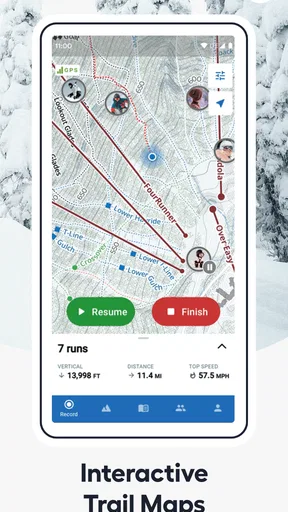
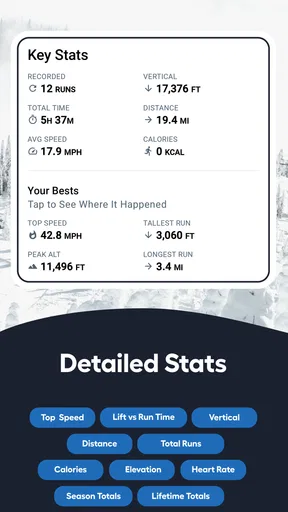
First off, let's talk about the tracking feature. It’s super intuitive and gives you a detailed overview of your day on the slopes. The app uses GPS to map out your runs, showing you where you’ve been and how you've performed. It’s like having a personal coach in your pocket. I remember my first day using it, and I was blown away by how much data it collected—speed, distance, elevation—all in real-time.
Weather and Snow Reports
We all know how unpredictable mountain weather can be. With Slopes, you get up-to-date weather and snow conditions. I’ve avoided more than one bad day on the slopes thanks to its accurate forecasts. Plus, it provides information on lift status, which is super handy when planning your runs.
Social Features
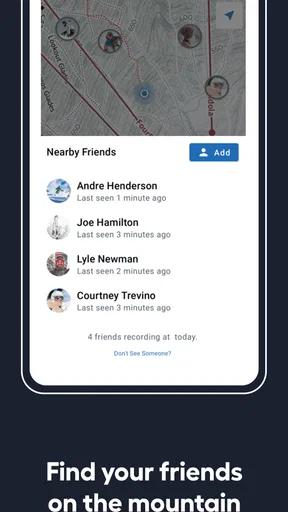
What’s a fun day on the mountain without a little friendly competition? The app includes social features where you can connect with friends, compare stats, and even challenge each other. Last winter, my friends and I had a blast trying to outdo each other’s top speeds and longest runs.
Ease of Use and Design
Now, I’m no tech wizard, but the design of the app is really user-friendly. It’s clean, intuitive, and doesn’t overwhelm you with options. Everything is where you’d expect it to be, and the learning curve is practically nonexistent. It’s refreshing to find an app that’s straightforward and doesn’t distract from the main event—skiing!
On top of that, the app is visually appealing. The interface uses vibrant colors and crisp graphics that make navigating through the features a joy. It’s one of those apps that feels polished and thoughtfully crafted.
Subscription and Premium Features
While the free version of Slopes is fantastic, there are premium features that really elevate the experience. For those invested in maximizing their time on the mountain, the subscription offers advanced analytics, 3D replays of your runs, and even offline trail maps. It’s definitely worth considering if you’re a regular on the slopes.
If you're hesitant about the subscription, the app offers a trial period for you to test out the premium perks. I gave it a shot and was hooked—it really adds another layer of depth to your skiing experience.
The Verdict
All in all, Slopes is an essential companion for anyone who loves hitting the mountain. Whether you're a seasoned pro or just starting out, the app provides valuable insights and makes your time on the slopes even more enjoyable. It’s like having a personal assistant that enhances your skiing experience, all while staying comfortably in your pocket.
So, next time you gear up for a day in the snow, give Slopes a try. Trust me, it’ll become as indispensable as your ski boots. Happy skiing!
Pros
- Intuitive interface for easy navigation.
- Detailed performance stats and analytics.
- Compatible with smartwatches for quick access.
- Offline maps available for remote areas.
- Social features to connect with friends.
Cons
- Limited features on the free version.
- Battery drain with GPS tracking enabled.
- Requires strong internet for live tracking.
- Occasional inaccuracies in location data.
- Subscription needed for premium features.
FAQs for Slopes: Ski & Snowboard
What features does Slopes: Ski & Snowboard offer?
Slopes provides detailed tracking of your skiing and snowboarding sessions using GPS. It offers interactive 3D maps, speed analysis, and weather conditions. The app also supports sharing your adventures with friends and offers Apple Watch integration for convenient on-the-go tracking. Additionally, it provides insights into your performance, helping you improve your skills.
Is Slopes: Ski & Snowboard available for both Android and iOS?
Yes, Slopes: Ski & Snowboard is available for both Android and iOS devices. It can be downloaded from the Google Play Store for Android users and the App Store for those on iOS. The app is designed to provide a seamless user experience across both platforms, ensuring you can track your activities no matter your device.
Does Slopes require an internet connection to function?
Slopes primarily uses GPS to track your skiing and snowboarding, so it doesn’t require an internet connection during your sessions. However, an internet connection is needed to download maps, access weather updates, and share your activities. It’s recommended to download necessary data before heading to the slopes to ensure uninterrupted tracking.
Are there any subscription fees for using Slopes?
Slopes offers both a free version and a premium subscription called Slopes Premium. The free version provides basic tracking and features, while the premium version offers advanced statistics, 3D maps, and other enhanced features. Users can opt for monthly or annual subscriptions, and there’s often a trial period available for new users to explore premium features.
How accurate is the tracking in Slopes: Ski & Snowboard?
Slopes uses high-precision GPS technology to accurately track your skiing and snowboarding activities. It records details like speed, distance, and elevation with impressive accuracy. However, the precision can vary based on GPS signal strength and environmental factors, so it’s advisable to ensure your device has good GPS reception for optimal performance.


